

User story from 2024 Toyota Tacoma Trailhunter driver
Started 2026-04-27 20:55:13 by Robofinity


 in User Review, Robofinity InsightDrive
Affordable Upgrade: Robofinity Car Thermal Night Devices Comparable to $85,000 Vision
Body
Here is the user story from David Childress, the 2024 Toyota Tacoma Trailhunter driver
In October of 2025, I was on my way to work before dawn driving through a wooded area near my job when a small deer darted out in front of me. I could not see it coming from the side of the road, and we collided. The deer ran off with minor injuries, but my one-year old truck was not as lucky. The damage to the front bumper & cover amounted to nearly $1,300.
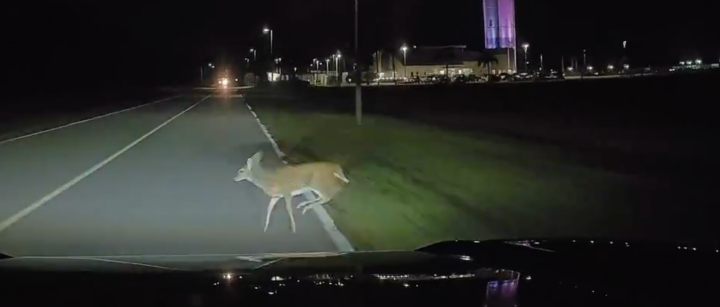
In November, I saw the Robofinity InsightDrive thermal camera on sale for Black Friday. My work vehicles have $85,000 FLIR systems installed on them, so I knew the value of thermal imaging; I ordered the InsightDrive system immediately. The system arrived soon after, and a quick 30-minute install was all it took to get it up and running.
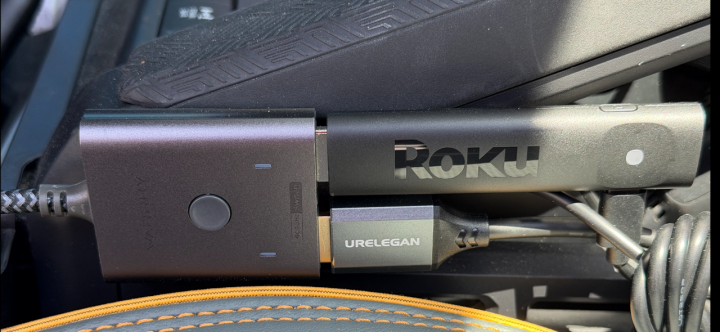
I liked the system, but wondered if I could tie it into the OEM (2024 Toyota Tacoma Trailhunter) vehicle display (which is massive at 14”). Using the Robofinity Multimedia Adapter and an Ottocast Media device (to get the HDMI into my OEM screen), another 30 minute install made my hopes a reality. Coupled with an HDMI switcher, I can now quickly choose Apple CarPlay or Insight Drive depending on my driving needs.
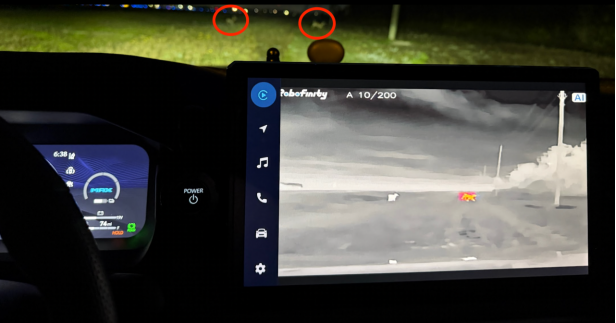
Now, no matter what the driving conditions are, I can see road hazards much more clearly.
Here are two more deer to avoid !!
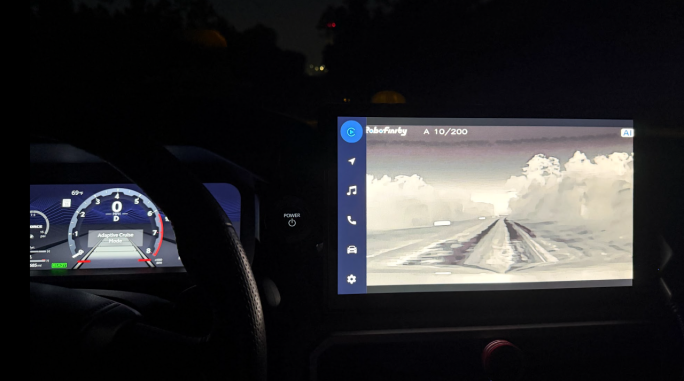
This is a totally dark trail with my headlights off.
4 Replies
-
@kblacksher
Replied 2026-10-06 17:37:46
Thank you David, can you please show your whole wiring setup I see the HDMI switch you have a cable going into it but how is connected before that and where is your HDMI cable going from the switch I have both the adapter for $95 one and the multi adapter one that came with the car lighter plug. Thank you again for the response
@Robofinity
We’re dedicated to thermal imaging innovation, empowering individuals and industries with cutting-edge tech to boost safety, efficiency, and quality of life. ·10+ years of mature industry expertise for premium product quality ·Served 30+ countries, Global reliability across diverse environments and driving conditions. ·Trusted by 3000+ users (drivers, fleets, safety-critical sectors) for stable performance ·Equipped with deep learning AI: precisely detects/measures distances to vehicles, pedestrians, animals (even varied postures) for proactive collision alerts ·Industry-leading thermal tech: AI-powered image preprocessing & super-resolution enhance clarity and object details ·User-centric: Prioritize experience in design, iterate continuously to make thermal imaging accessible to all




Replied 2026-09-19 22:27:40
This message is to David I own a 2022 Toyota Highlander platinum can you please give me directions to set it up to my screen I ordered Robofinity Multimedia adapter for insite and ottocast pro p3 ai box and the two way switch HDMI ugreen HDMI switch 2 in 1 out 4k@60hz bidirectional hdr 3d box and the outtocast 4in 1 car tv mate max and wireless CarPlay adapter the hdmi cables usb to usb c cables there is no clear way or clear instructions to hook this up help me please Thank you in advance
Hi Karon, David might not be able to reply to your message right away. You can refer to this video for the installation of the multimedia adapter
; if you have any questions, please contact our customer service team, and we will be happy to assist you. Customer support: [email protected]SignatureRobofinity InsightDrive, AI-Powered Thermal Imaging Innovations for Driving, accompany you on every safe journey.@kblacksher
Replied 2026-09-17 06:03:32
This message is to David I own a 2022 Toyota Highlander platinum can you please give me directions to set it up to my screen I ordered Robofinity Multimedia adapter for insite and ottocast pro p3 ai box and the two way switch HDMI ugreen HDMI switch 2 in 1 out 4k@60hz bidirectional hdr 3d box and the outtocast 4in 1 car tv mate max and wireless CarPlay adapter the hdmi cables usb to usb c cables there is no clear way or clear instructions to hook this up help me please Thank you in advance
@RoboBAM
Greetings. I am interested in porting my Robofinity to my 2023 Toyota Highlander's CarPlay screen. I use my iPhone primarly for CarPlay. You mentioned "Robofinity Multimedia Adapter and an Ottocast Media device (to get the HDMI into my OEM screen)". Could you be more specific as to all the details in layman's terms? The Roku thumb device, 2 HDMI connectors and a non-specific black box with a push button, in your pic confuses me as to how they are used. Where/What is a HDMI signal used and plugged into? Specifically, what gets the Robofinity image to the OEM screen?
Thanks
[ Thermal Cam --> Robofinity box --> ??? Multimedia Adptr ??? ---> ??????? -->OEM screen